NotesExperiment
283ms to open one view: two reasons the UX/UI gallery stuttered
In a gallery with 400 animated elements on one page, the reels view and the prompt dialog stuttered. How I found the causes with a Chrome performance trace and cut 283ms to 33–50ms.
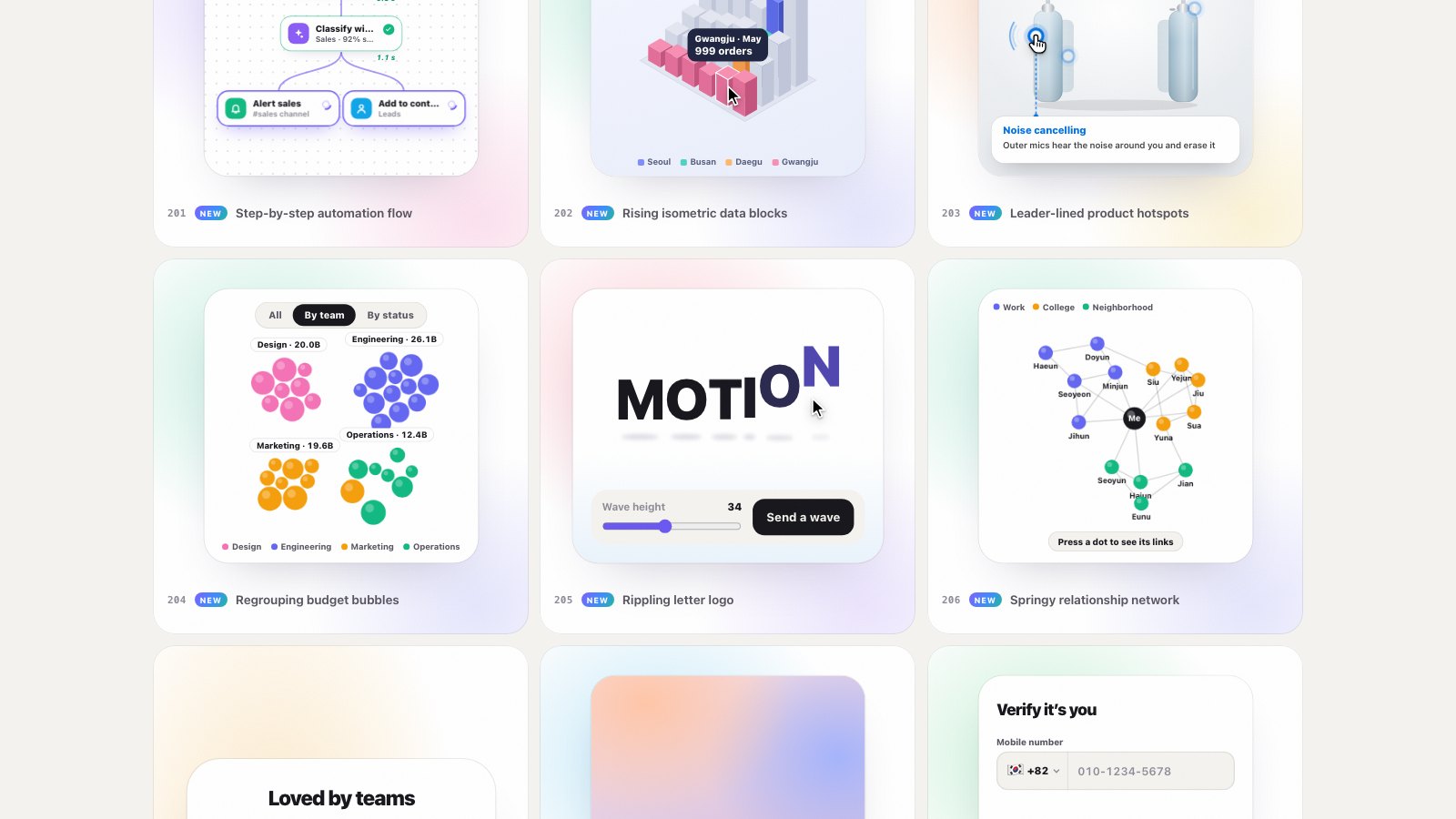
Lucian UX/UI Prompt is a gallery where you can try 400 interface elements, such as buttons, charts and forms, on a single page. Each card holds a small working demo that starts moving on its own when it scrolls into view.
The gallery has two more views. The reels view lets you flip through elements one at a time at full size, and the prompt dialog shows an element's prompt and code. On October 12, I noticed the screen hitched for a moment when either one opened. If you can feel it, it is usually over 100ms.
Measure first
Before fixing anything by feel, I recorded the moment the reels view opened with a Chrome DevTools performance trace. I took the measurements with a script that repeats the same actions in headless Chrome. It draws in software without a GPU, so the numbers come out larger than on a real device, but it is good enough for comparing before and after under the same conditions.
| Action | Longest frame |
|---|---|
| Open reels (first time) | 283ms |
| Close reels | 167ms |
| Next slide in reels | 117ms |
| Open prompt dialog | 75ms |
To hold 60fps, each frame has to finish within 16.7ms. At 283ms, the screen froze for nearly 17 frames.
Cause 1: opening the reels prepared every slide at once
The trace showed a 172ms long task at the moment the reels view opened. Inside it, style recalculation (Update Layout Tree) took 94ms and event handling 103ms, and all of it started from one function that decides the current slide.
Following the code, I found that opening the reels view built a frame for every slide and attached a demo to each one. The user sees one slide, but the browser was preparing hundreds. On top of that, the cards of the original gallery behind the reels kept animating.
I changed three things.
- Fill only the slides near the visible one. Slides start as empty frames, and only the two slides before and after the current one get content. Slides four or more away are emptied.
- Unload the gallery behind a moment later. The demos in the gallery behind are unloaded after the reels' opening transition ends (700ms), so heavy work does not overlap the transition.
- Pause background animations on slides that are not visible.
.g-slide:not(.is-on) .g-slide-bg { animation-play-state: paused; }| Action | Before | After |
|---|---|---|
| Open reels (first time) | 283ms | 33–50ms |
| Close reels | 167ms | 17ms |
| Next slide in reels | 117ms | 17ms |
| Animations running at once | 202 | 7 |
The number of animations running at once dropped the most. 195 things nobody could see had been moving the whole time.
Cause 2: the blur behind the prompt dialog
When the prompt dialog opens, it covers the page behind it with a blur. In CSS, that is backdrop-filter: blur(10px) on the dialog's backdrop (::backdrop). It looks nice, but dozens of demos were moving behind it.
To find which one was the cause, I changed one condition at a time.
| Condition | Longest frame | Frames over 50ms |
|---|---|---|
| As is (blur + animations behind) | 75ms | 11 |
| Only the animations behind paused | 75ms | 6 |
| Only the blur removed | 34ms | 0 |
Turning off the blur fixed it right away. The trace also showed almost no JavaScript; most of the time went to the graphics work of compositing the screen. A blur has to read every pixel behind it and mix them again on every frame. When the page behind is moving, that work repeats without end.
Instead of the blur, I covered the page with its background color at 84% opacity. The page behind is hidden well enough that the focus on the dialog feels almost the same.
/* before */
.g-dlg::backdrop { backdrop-filter: blur(10px) saturate(170%); }
/* after */
.g-dlg::backdrop { background: color-mix(in srgb, var(--ux-page) 84%, transparent); }
A trap: :has() was slow
While the dialog was open, I also wanted to pause the demos behind it. At first I did it cleanly with CSS alone.
body:has(dialog[open]) .g-slide-bg { animation-play-state: paused; }But with this rule in place, opening the dialog took close to 100ms again. :has() selects a parent based on the state of its children, so every time the dialog opens or closes, the browser rechecks styles across the whole document. On a page with thousands of elements, that cost is large.
So I changed the code that opens and closes the dialog to add and remove a class on body directly.
dialog.addEventListener('close', () => document.body.classList.remove('has-dlg'));
// on open: document.body.classList.add('has-dlg'); dialog.showModal();body.has-dlg .g-slide-bg { animation-play-state: paused; }The final result: 33–42ms to open the dialog, 33ms to close it, and no frames over 50ms.
Summary
| Problem | Cause | Fix |
|---|---|---|
| Opening reels took 283ms | Every slide prepared, even unseen ones | Fill only two slides on each side; unload the gallery behind after the transition |
| Prompt dialog took 75ms | A blur over a moving page | An 84% translucent cover instead of a blur |
| Dialog slowed back to 100ms | :has() applied across the whole document | Toggle a class on body |
All three problems came down to the same thing: work was happening where nobody could see it. Slides off screen, demos moving behind a cover, a selector that rescanned everything on each change. Deciding what not to draw paid off more than deciding what to draw.
The numbers are from software rendering in headless Chrome, so on a real device with a GPU both before and after come out smaller. In ratio terms, opening the reels got more than 5 times faster and opening the dialog about 2 times faster.